Access Google API from within Github Actions using federated credentials
Goal: in my case i need to talk to search console api from within github actions, and i wish to not store secrets nor deal with service account json credentials
How it works
- Github Actions issues an OIDC token (not secret)
- Google Cloud trusts Github as identity provider
- Google exchanges OIDC from github for short lived access token
- We can call search console api with exchanged token
Prerequisites
Enable API
IAM Service Account Credentials API
iamcredentials.googleapis.com
Service Account Credentials API allows developers to create short-lived, limited-privilege credentials for their service accounts on GCP.
This one will be used to create access tokens that we will use in our github action to access search console api
Security Token Service API
sts.googleapis.com
The Security Token Service exchanges Google or third-party credentials for a short-lived access token to Google Cloud resources.
This one is used to exchange github oidc token to so called federated token, which we will exchange one more time using iam service account credentials
Google Search Console API
searchconsole.googleapis.com
The Search Console API provides access to both Search Console data (verified users only) and to public information on an URL basis (anyone)
this one is the target api we wish to use, here we may want to enable any other api
Service Account
We still need to create an service account - the key difference is that we do not need its credentials json anymore - we will exchange github oidc token for this account access token instead.
Do not forget to give desired roles for service account so once exchanged, access token will have required privileges running requests on behalf service account
Note: search console api does not have roles and works little bit different, from within search console we need to add service account email to our site and give it required privileges because there is nothing about that in google cloud console.
You can add users here:
https://search.google.com/search-console/usersSo in my case i have added email of created service account with restricted privileges which should be enough to read data
Workload Identity Pool
From IAM & Admin menu navigate to Workload Identity Federation or from search bar search for "Workload Identity Pool"
Here are notes from its getting started page
Workload Identity allows your workloads to access Google Cloud without Service Account keys. There are 4 steps to setting up a workload identity:
- Create a workload identity pool: The pool organizes and manages external identities. IAM lets you grant access to identities in the pool.
- Connect an identity provider: Add either AWS or OpenID Connect (OIDC) providers to your pool.
- Configure provider mapping: Set attributes and claims from providers to show up in IAM.
- Grant access: Use a service account to allow pool identities to access resources in Google Cloud.
Once proceeded to pool creation give it some name, like "github"
As provider choose "OpenID Connect (OIDC)"
and for provider detail fill following:
- Provider name:
github - Issuer (URL):
https://token.actions.githubusercontent.com - Audiences:
Default audience
On next step, wizard will ask you to configure mappings, so it know what to expect from github oidc token and how to map its claims.
At least subject claim is required - so we need to pass it.
Also, from my experiments it seems like we really need to have repository and probably ref maps, so just in case, following docs i configured all of them like so
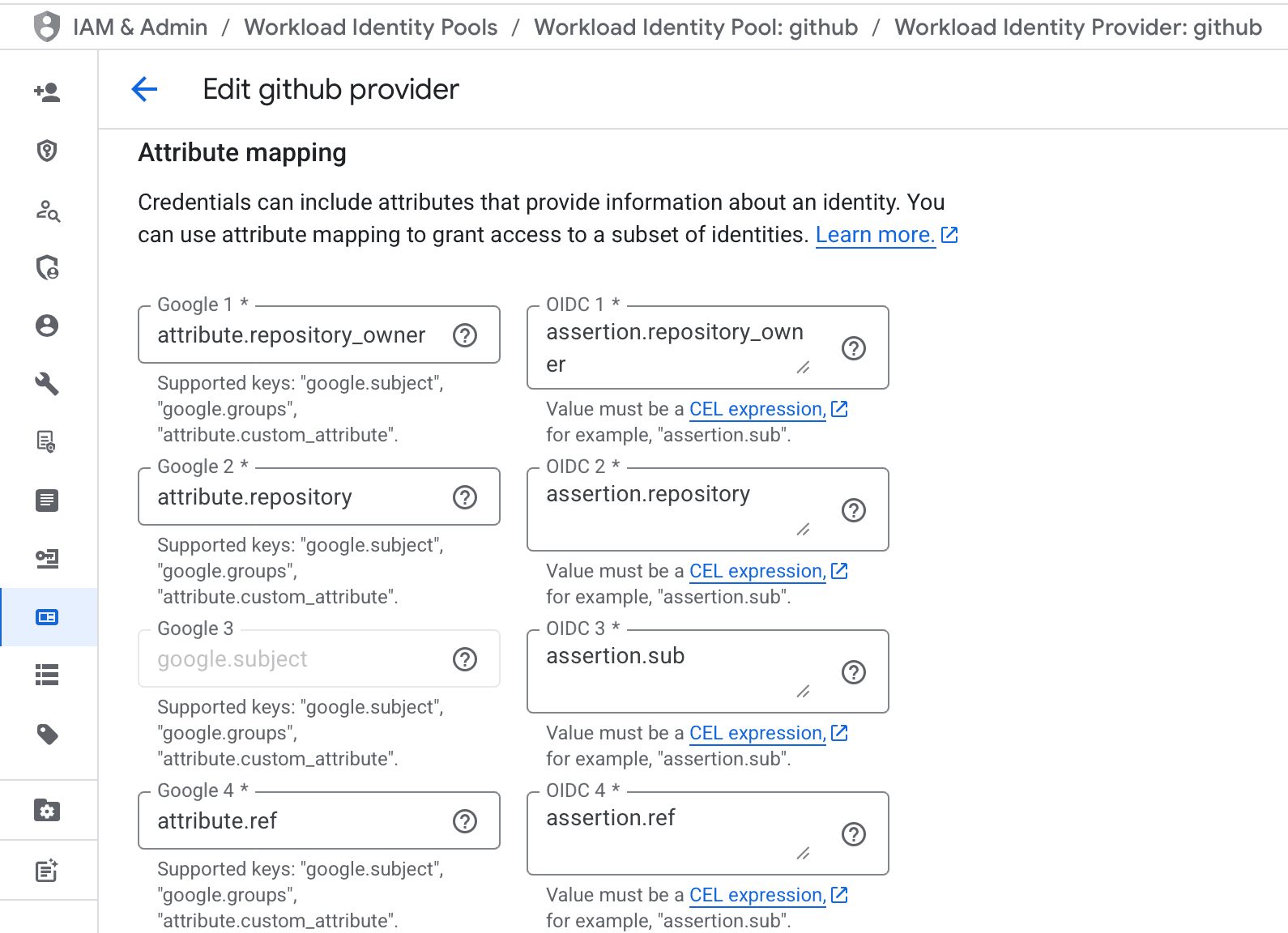
Also, you need to configure conditions - e.g. restrict access, i did it like so
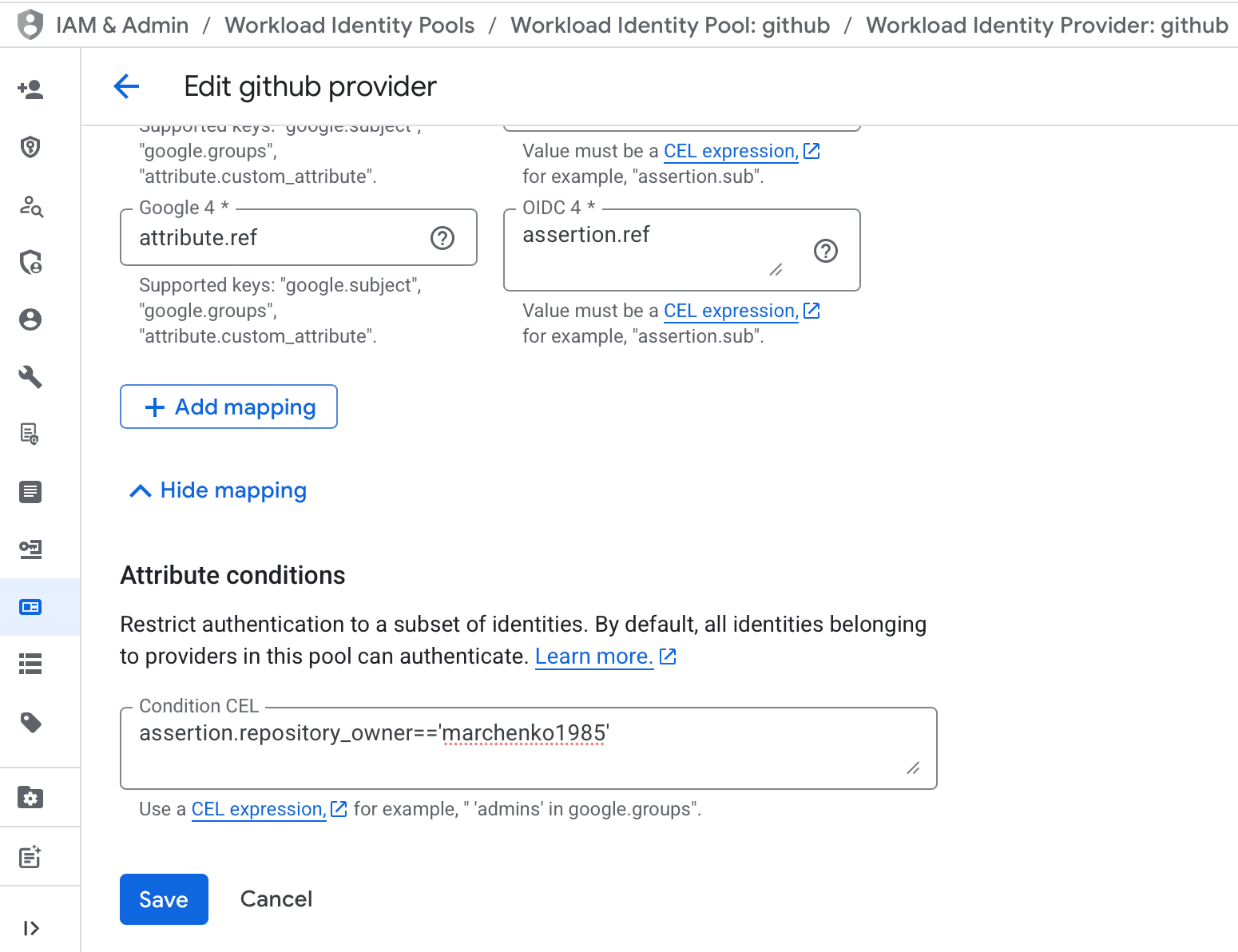
What is important, in my case i did:
assertion.repository_owner=='marchenko1985'which is kind of widest range, you may want, for example, to restrict it to concrete repository like so
assertion.repository=='marchenko1985/some_repo'You may want to configure even more strict rules here - aka allow only concrete repositories or actions from main branches and so on.
Configure Workload Identity Federation with deployment pipelines has more details on how to configure everything.
Technically via this wizard we have created identity pool as well as identity provider attached to it.
Also, when we choose Default audience, wizard did give us url like this:
https://iam.googleapis.com/projects/348636136344/locations/global/workloadIdentityPools/github/providers/githubwhere
https://iam.googleapis.com/projects/<PROJECT_ID>/locations/global/workloadIdentityPools/<POOL_NAME>/providers/<PROVIDER_NAME>keep this, we will need it later in github actions
Allow impersonation
This step is required and without it nothing will work
We need to give very specific role for our service account
So navigate to it, and under "Principals with access"
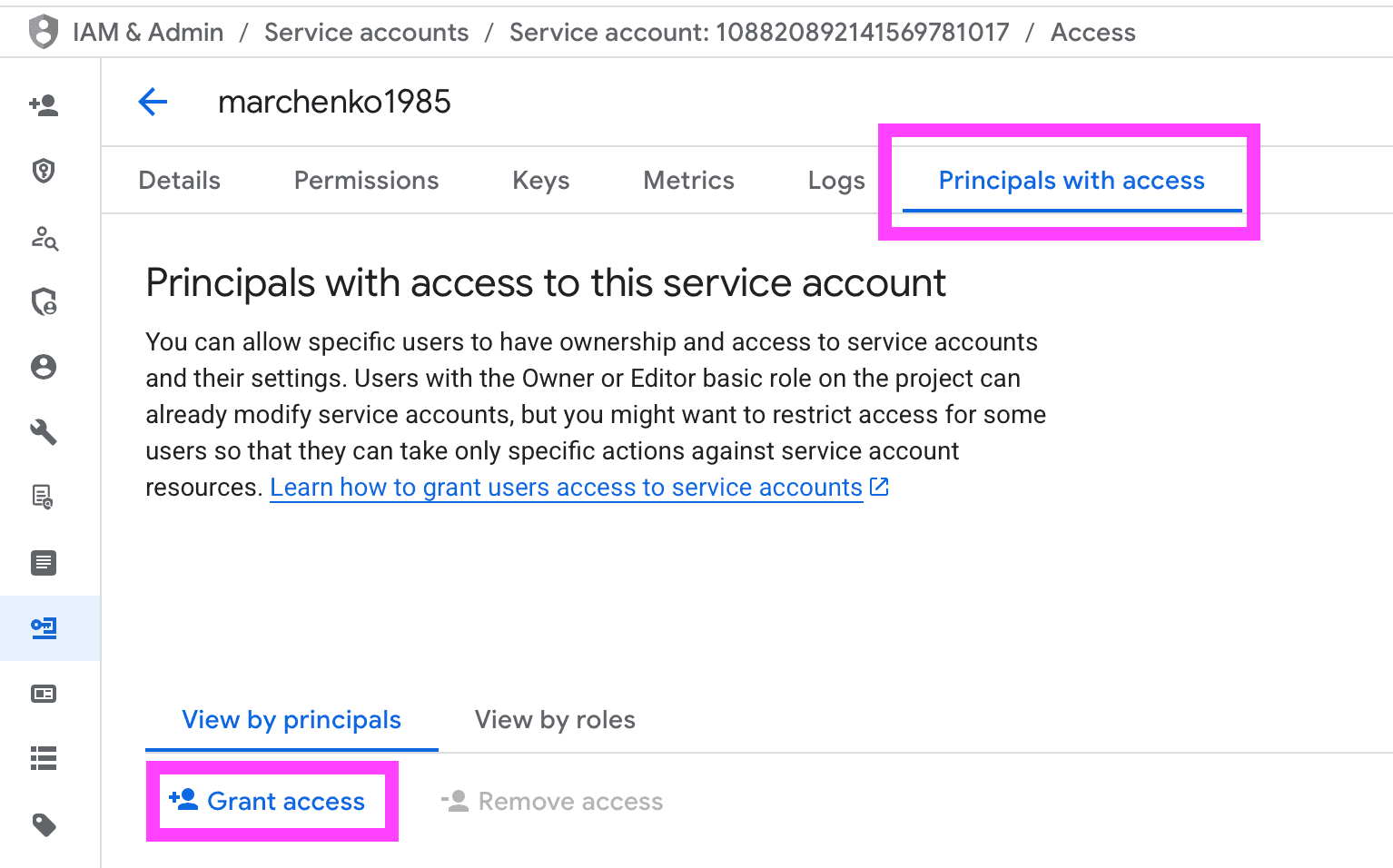
grant access to
principalSet://iam.googleapis.com/projects/348636136344/locations/global/workloadIdentityPools/github/attribute.repository_owner/marchenko1985 principal, and for role choose Workload Identity User
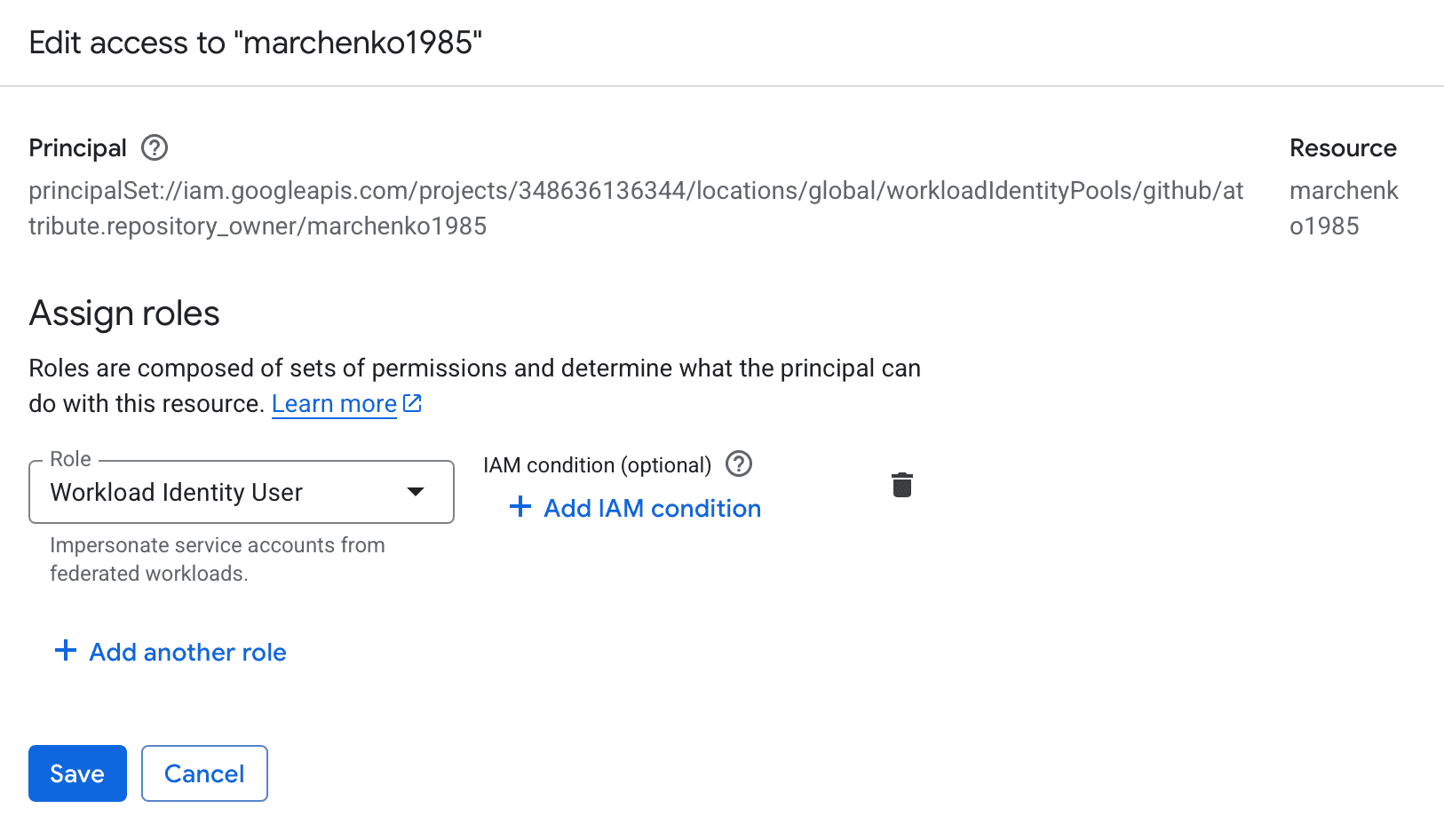
Note: if you choose repo, principal will be different, do read manuals mentioned above
Github Actions
Now we need to allow our service account to be called on behalf of github oidc token but while we did not saw this tokens we can not do it so proceding to github actions side let's have some simple action just to verify if everything working
name: google
on:
  workflow_dispatch:
permissions:
  # contents: read # at moment we do not need to read repo contents
  id-token: write # but we want to play with OIDC tokens
jobs:
  google:
    runs-on: ubuntu-latest
    steps:
      # - uses: actions/checkout@v6 # at moment we do not need to checkout repo contents

      # OpenID Connect
      # OpenID Connect allows your workflows to exchange short-lived tokens directly from your cloud provider.
      # https://docs.github.com/en/actions/concepts/security/openid-connect

      # Methods for requesting the OIDC token
      # https://docs.github.com/en/actions/reference/security/oidc#methods-for-requesting-the-oidc-token
      # states that there will be two environment variables available

      - name: ACTIONS_ID_TOKEN_REQUEST_URL
        run: |
          echo "ACTIONS_ID_TOKEN_REQUEST_URL: $ACTIONS_ID_TOKEN_REQUEST_URL"
        # ACTIONS_ID_TOKEN_REQUEST_URL: https://run-actions-2-azure-eastus.actions.githubusercontent.com/152//idtoken/6a5e4506-885f-4c7b-a4cf-70f6e241634b/d78f7636-37d2-56e6-a557-10cab26cfb09?api-version=2.0

      - name: ACTIONS_ID_TOKEN_REQUEST_TOKEN
        run: |
          echo "ACTIONS_ID_TOKEN_REQUEST_TOKEN: $ACTIONS_ID_TOKEN_REQUEST_TOKEN"
        # ACTIONS_ID_TOKEN_REQUEST_TOKEN: xxx

      # which may be used to retrieve the OIDC token like so
      - name: retrieve OIDC token
        run: |
          curl -H "Authorization: bearer $ACTIONS_ID_TOKEN_REQUEST_TOKEN" "$ACTIONS_ID_TOKEN_REQUEST_URL"
        # {"value":"***"}
This one did not give us to much because of github actions logs are trying to hide sensitive data from us
For us to get it we will use hack with hex
Here is how it works
echo -n "Hello World" | xxd -pwill produce 48656c6c6f20576f726c64
and to decode it back
echo "48656c6c6f20576f726c64" | xxd -r -pSo here is alternative yaml
name: google
on:
  workflow_dispatch:
permissions:
  # contents: read # at moment we do not need to read repo contents
  id-token: write # but we want to play with OIDC tokens
jobs:
  google:
    runs-on: ubuntu-latest
    steps:
      # - uses: actions/checkout@v6 # at moment we do not need to checkout repo contents

      # OpenID Connect
      # OpenID Connect allows your workflows to exchange short-lived tokens directly from your cloud provider.
      # https://docs.github.com/en/actions/concepts/security/openid-connect

      # Methods for requesting the OIDC token
      # https://docs.github.com/en/actions/reference/security/oidc#methods-for-requesting-the-oidc-token
      # states that there will be two environment variables available

      - name: ACTIONS_ID_TOKEN_REQUEST_URL
        run: |
          echo "ACTIONS_ID_TOKEN_REQUEST_URL: $ACTIONS_ID_TOKEN_REQUEST_URL"
        # ACTIONS_ID_TOKEN_REQUEST_URL: https://run-actions-2-azure-eastus.actions.githubusercontent.com/152//idtoken/6a5e4506-885f-4c7b-a4cf-70f6e241634b/d78f7636-37d2-56e6-a557-10cab26cfb09?api-version=2.0

      - name: ACTIONS_ID_TOKEN_REQUEST_TOKEN
        run: |
          echo "ACTIONS_ID_TOKEN_REQUEST_TOKEN: $ACTIONS_ID_TOKEN_REQUEST_TOKEN" | xxd -p

      # which may be used to retrieve the OIDC token like so
      - name: retrieve OIDC token
        run: |
          curl -s -H "Authorization: bearer $ACTIONS_ID_TOKEN_REQUEST_TOKEN" "$ACTIONS_ID_TOKEN_REQUEST_URL&audience=HelloWorld" | jq -r .value | xxd -p

      # and here is how can we retrieve token using getIDToken
      - name: getIDToken
        uses: actions/github-script@v8
        with:
          script: |
            core.getIDToken('HelloWorld').then(token => {
              // console.log(token) // will output: xxx
              // trick with hex output
              console.log(Buffer.from(token, 'utf8').toString('hex'))
            })
Note how we did encode both values with xxd so we can get it from logs
so inside ACTIONS_ID_TOKEN_REQUEST_TOKEN we have following:
{
  "IdentityTypeClaim": "System:ServiceIdentity",
  "ac": "[{\"Scope\":\"refs/heads/main\",\"Permission\":3}]",
  "acsl": "10",
  "aud": "HelloWorld",
  "billing_owner_id": "...",
  "exp": 1766242035,
  "http://schemas.microsoft.com/ws/2008/06/identity/claims/primarysid": "dddddddd-dddd-dddd-dddd-dddddddddddd",
  "http://schemas.xmlsoap.org/ws/2005/05/identity/claims/sid": "dddddddd-dddd-dddd-dddd-dddddddddddd",
  "iat": 1766219835,
  "iss": "https://token.actions.githubusercontent.com",
  "job_id": "1dceee7c-eee3-5898-b4a3-e349255ee79b",
  "nameid": "dddddddd-dddd-dddd-dddd-dddddddddddd",
  "nbf": 1766219535,
  "oidc_extra": "{\"actor\":\"marchenko1985\",\"actor_id\":\"88868\",...}",
  "oidc_sub": "repo:marchenko1985/marchenko1985:ref:refs/heads/main",
  "orch_id": "...",
  "owner_id": "...",
  "plan_id": "...",
  "repository_id": "352284565",
  "run_id": "20391870713",
  "run_number": "2",
  "run_type": "full",
  "runner_id": "1000000363",
  "runner_type": "hosted",
  "scp": "...",
  "sha": "...",
  "trust_tier": "2"
}
which is interesting, there is nothing very special, it is used to identify us, when we are asking for oidc token
second curl call output is our OIDC token which we will pass to Google to exchange it for google service account access token
{
  "actor": "marchenko1985",
  "actor_id": "88868",
  "aud": "https://github.com/marchenko1985",
  "base_ref": "",
  "check_run_id": "58602234763",
  "event_name": "workflow_dispatch",
  "exp": 1766220137,
  "head_ref": "",
  "iat": 1766219837,
  "iss": "https://token.actions.githubusercontent.com",
  "job_workflow_ref": "marchenko1985/marchenko1985/.github/workflows/google.yml@refs/heads/main",
  "job_workflow_sha": "9d1c0030434f78ae61041cb49166386c21b1124f",
  "jti": "6b4848f3-b246-4968-9638-c4e9e20611e8",
  "nbf": 1766219537,
  "ref": "refs/heads/main",
  "ref_protected": "false",
  "ref_type": "branch",
  "repository": "marchenko1985/marchenko1985",
  "repository_id": "352284565",
  "repository_owner": "marchenko1985",
  "repository_owner_id": "88868",
  "repository_visibility": "public",
  "run_attempt": "1",
  "run_id": "20391870713",
  "run_number": "2",
  "runner_environment": "github-hosted",
  "sha": "9d1c0030434f78ae61041cb49166386c21b1124f",
  "sub": "repo:marchenko1985/marchenko1985:ref:refs/heads/main",
  "workflow": "google",
  "workflow_ref": "marchenko1985/marchenko1985/.github/workflows/google.yml@refs/heads/main",
  "workflow_sha": "9d1c0030434f78ae61041cb49166386c21b1124f"
}
Note: in both cases we are dealing with usual JWT, there is nothing secret in tokens them selves, the key is their signature and ability to verify it in github
github has public endpoint for oidc which we can find in token itself iss claim - https://token.actions.githubusercontent.com
and because it is an oidc it has /.well-known/openid-configuration endpoint so we can access it https://token.actions.githubusercontent.com/.well-known/openid-configuration which is quite interesting, it indeed has jwks configured (aka async encryption with public and private keys) but it miss token or verify endpoints but we do not need them, google from its side will read jwks configuration and public key with corresponding jit from token to verify token signature
Also note how aud is set, if you pass it, it will be set like HelloWorld in getIDToken example, if not - then it will default to https://github.com/marchenko1985
BUT, it is important to set it to one Google is expecting - aka //iam.googleapis.com/projects/<PROJECT_NUMBER>/locations/global/workloadIdentityPools/<POOL_NAME>/providers/<PROVIDER_NAME> so in my case it is //iam.googleapis.com/projects/348636136344/locations/global/workloadIdentityPools/github/providers/github
Exchange tokens
There are ready to use github actions that will make things easier, but before proceeding to them, let's give it a try and exchange tokens manually
Technically it will be something like this:
Step 1: Retrieve Github OIDC token
This one we already did in previous examples
token=$(curl -s -H "Authorization: bearer $ACTIONS_ID_TOKEN_REQUEST_TOKEN" "$ACTIONS_ID_TOKEN_REQUEST_URL&audience=//iam.googleapis.com/projects/348636136344/locations/global/workloadIdentityPools/github/providers/github" | jq -r .value)Note: how we did add &audience=//iam.googleapis.com/projects/348636136344/locations/global/workloadIdentityPools/github/providers/github we need this, so signed token will have corresponding audience, which will tell google that indeed by intent this token were generated to be sent to sts.googleapis.com later on.
Otherwise default audience will be set to https://github.com/marchenko1985 and our attempt to call STS will fail with error:
{
  "error": "invalid_grant",
  "error_description": "The audience in ID Token [https://github.com/marchenko1985] does not match the expected audience."
}
Step 2: Exchange GitHub OIDC → Google federated token (STS)
This is the RFC 8693 token exchange call.
sts=$(curl -s -X POST https://sts.googleapis.com/v1/token -H "Content-Type: application/json" -d "{
  \"grant_type\": \"urn:ietf:params:oauth:grant-type:token-exchange\",
  \"audience\": \"//iam.googleapis.com/projects/348636136344/locations/global/workloadIdentityPools/github/providers/github\",
  \"scope\": \"https://www.googleapis.com/auth/cloud-platform\",
  \"requested_token_type\": \"urn:ietf:params:oauth:token-type:access_token\",
  \"subject_token_type\": \"urn:ietf:params:oauth:token-type:jwt\",
  \"subject_token\": \"$token\"
}" | jq -r .access_token)
This token:
- Is short-lived (1 hour)
- Represents "GitHub Actions identity"
- Is NOT yet your service account
- In Google access tokens are not JWT so we won't be able to see what's inside
More details can be found here
Notes on payload
grant_type=urn:ietf:params:oauth:grant-type:token-exchange- note this unusual grant type, this one comes from RFC 8693 which allows to exchange token from one provider to anotheraudienceaudience should be exactly our configured pool provider - think of this - we are asking github to sign oidc token for us, and telling that this token will be passed to concrete this audience, then we are sending this token to google and he not only verifies that token is signed correctly but also that it was intentionally signed to be passed to concrete this audience - aka few layers of security checksscope=https://www.googleapis.com/auth/cloud-platform- google specific, should be set exactly to this, here are not yet dealing with desired search console api, but rather with STS and we need scope for itrequested_token_type=urn:ietf:params:oauth:token-type:access_tokenas you may guess we are saying that we are requesting access tokensubject_token_type=urn:ietf:params:oauth:token-type:jwt- here we are saying that instead of user credentials we will pass jwt tokensubject_token=$token- and here we are passing github token
Under the hood: from given
$tokengoogle will see issuer, from its well known endpoint will find jwks endpoins, and public key for jit and will be able to verify if token is valid or not, and also check mentioned audiences
Step 3: Impersonate the Service Account
Now we call IAM Credentials API using the federated token.
access_token=$(curl -s -X POST "https://iamcredentials.googleapis.com/v1/projects/-/serviceAccounts/marchenko1985@marchenko1985.iam.gserviceaccount.com:generateAccessToken" -H "Authorization: Bearer $sts" -H "Content-Type: application/json" -d '{
  "scope": ["https://www.googleapis.com/auth/webmasters.readonly"]
}' | jq -r .accessToken)
Notes:
- url is fomder like this:
https://iamcredentials.googleapis.com/v1/projects/-/serviceAccounts/<SERVICE_ACCOUNT_EMAIL>:generateAccessToken
Step 4: Calling search console api
and finally we can call our search console api to see if it is working like so
curl -s -H "Authorization: Bearer $access_token" https://searchconsole.googleapis.com/webmasters/v3/sitesand if everything is ok we will receive something like
{
  "siteEntry": [
    {
      "siteUrl": "https://marchenko1985.github.io/",
      "permissionLevel": "siteRestrictedUser"
    }
  ]
}
Once again remember that for concrete search console api you need to add your service account email as a user from withing google webmaster tools, it has no equivalent in google cloud console
Verifiying if everything was configured correctly
Here are few commands that may be useful to check if everything is configured correctly
PROJECT_ID="marchenko1985"
PROJECT_NUMBER="348636136344"
POOL_ID="github"
PROVIDER_ID="github"
SA_EMAIL="marchenko1985@marchenko1985.iam.gserviceaccount.com"
REPO="marchenko1985/marchenko1985"
Confirm workload identity pool exists
gcloud iam workload-identity-pools describe "$POOL_ID" --project="$PROJECT_ID" --location="global"should output something like this:
displayName: github
name: projects/348636136344/locations/global/workloadIdentityPools/github
state: ACTIVE
confirm provider exists
gcloud iam workload-identity-pools providers describe "$PROVIDER_ID" --project="$PROJECT_ID" --location="global" --workload-identity-pool="$POOL_ID"should output
attributeCondition: assertion.repository_owner=='marchenko1985'
attributeMapping:
  attribute.ref: assertion.ref
  attribute.repository: assertion.repository
  attribute.repository_owner: assertion.repository_owner
  google.subject: assertion.sub
displayName: github
name: projects/348636136344/locations/global/workloadIdentityPools/github/providers/github
oidc:
  issuerUri: https://token.actions.githubusercontent.com
state: ACTIVE
here we should check:
issuerUriishttps://token.actions.githubusercontent.comattributeMappingcontainsgoogle.subject,attribute.repositoryandattribute.ref- seems like that is required minimum, in our case, i wanted wider access so also addedrepository_ownerattributeConditionis set, and is using attributes that appear inattributeMapping
Verify Service Account IAM binding
gcloud iam service-accounts get-iam-policy "$SA_EMAIL" --project="$PROJECT_ID"bindings:
- members:
- principalSet://iam.googleapis.com/projects/348636136344/locations/global/workloadIdentityPools/github/attribute.repository_owner/marchenko1985
role: roles/iam.workloadIdentityUser
etag: BwZGYg5Oj3U=
version: 1this one checks that we have granted access, make sure to be correct with attributes, like in my case, i wanted wirder access, that's why i have this attribute.repository_owner/marchenko1985 at the end
And if everything configured correctly following sample github action should work
name: google
on:
  workflow_dispatch:
permissions:
  id-token: write
jobs:
  google:
    runs-on: ubuntu-latest
    steps:
      - run: |
          # github token
          token=$(curl -s -H "Authorization: bearer $ACTIONS_ID_TOKEN_REQUEST_TOKEN" "$ACTIONS_ID_TOKEN_REQUEST_URL&audience=//iam.googleapis.com/projects/348636136344/locations/global/workloadIdentityPools/github/providers/github" | jq -r .value)

          # federated token (RFC 8693 token exchange call to Google STS)
          sts=$(curl -s -X POST https://sts.googleapis.com/v1/token -H "Content-Type: application/json" -d "{
            \"grant_type\": \"urn:ietf:params:oauth:grant-type:token-exchange\",
            \"audience\": \"//iam.googleapis.com/projects/348636136344/locations/global/workloadIdentityPools/github/providers/github\",
            \"scope\": \"https://www.googleapis.com/auth/cloud-platform\",
            \"requested_token_type\": \"urn:ietf:params:oauth:token-type:access_token\",
            \"subject_token_type\": \"urn:ietf:params:oauth:token-type:jwt\",
            \"subject_token\": \"$token\"
          }" | jq -r .access_token)

          # service account access token
          access_token=$(curl -s -X POST "https://iamcredentials.googleapis.com/v1/projects/-/serviceAccounts/marchenko1985@marchenko1985.iam.gserviceaccount.com:generateAccessToken" -H "Authorization: Bearer $sts" -H "Content-Type: application/json" -d '{
            "scope": ["https://www.googleapis.com/auth/webmasters.readonly"]
          }' | jq -r .accessToken)

          # call google search console api
          curl -s -H "Authorization: Bearer $access_token" https://searchconsole.googleapis.com/webmasters/v3/sites
and if everything correct you should see desired
{
  "siteEntry": [
    {
      "siteUrl": "https://marchenko1985.github.io/",
      "permissionLevel": "siteRestrictedUser"
    }
  ]
}
Github Actions
now, when we have low level understanding of what and how it works, it is time to see which github actions available to make it easier
initially we may try something like this:
name: google
on:
  workflow_dispatch:
permissions:
  id-token: write
jobs:
  google:
    runs-on: ubuntu-latest
    steps:
      - uses: google-github-actions/auth@v3
        with:
          workload_identity_provider: projects/348636136344/locations/global/workloadIdentityPools/github/providers/github
          service_account: marchenko1985@marchenko1985.iam.gserviceaccount.com

      # here we are installing gcloud cli, so we can easily retrieve access token
      - uses: google-github-actions/setup-gcloud@v3

      # for sake of demonstration, check that we are signed in
      - run: gcloud auth list
        # ACTIVE  ACCOUNT
        # *       marchenko1985@marchenko1985.iam.gserviceaccount.com

      # example of how access token can be retrieved
      - run: gcloud auth print-access-token
        # ya29.c.....

      # example of calling search console api
      - name: Call Search Console API
        run: |
          curl -H "Authorization: Bearer $(gcloud auth print-access-token)" "https://searchconsole.googleapis.com/webmasters/v3/sites"
but it will fail with error like
{
  "error": {
    "code": 403,
    "message": "Request had insufficient authentication scopes.",
    "errors": [
      {
        "message": "Insufficient Permission",
        "domain": "global",
        "reason": "insufficientPermissions"
      }
    ],
    "status": "PERMISSION_DENIED",
    "details": [
      {
        "@type": "type.googleapis.com/google.rpc.ErrorInfo",
        "reason": "ACCESS_TOKEN_SCOPE_INSUFFICIENT",
        "domain": "googleapis.com",
        "metadata": {
          "method": "google.searchconsole.v1.SitesService.List",
          "service": "searchconsole.googleapis.com"
        }
      }
    ]
  }
}
which is kind of obvious - we did not requested scopes
more correct way will be to do it like so
name: google
on:
  workflow_dispatch:
permissions:
  id-token: write
jobs:
  google:
    runs-on: ubuntu-latest
    steps:
      - uses: google-github-actions/auth@v3
        id: auth
        with:
          workload_identity_provider: projects/348636136344/locations/global/workloadIdentityPools/github/providers/github
          service_account: marchenko1985@marchenko1985.iam.gserviceaccount.com
          token_format: access_token
          access_token_scopes: https://www.googleapis.com/auth/webmasters.readonly

      - run: |
          curl -H "Authorization: Bearer ${{ steps.auth.outputs.access_token }}" "https://searchconsole.googleapis.com/webmasters/v3/sites"
which is technically our final results - with such setup we may exchange github oidc token to our service account access token that we may use in our github actions scripts - profit
and the beauty of this approach is that we can reuse it accross different repositories and there is no need to store any secrets - and as result - nothing to hide, rotate, revoke - profit